Connect your Open Quantum account to qBraid to run quantum jobs on your own Open Quantum credits.
The Open Quantum integration lets you run quantum jobs on Open Quantum devices through qBraid, paid for with your own Open Quantum credits. Open Quantum devices can only be billed to Open Quantum credits, so you need to connect your Open Quantum account before you can run jobs on them.
“Free” means free of qBraid credits, not free of charge. Open Quantum
devices are listed as free on qBraid because running a job on one costs you no
qBraid credits. The job is instead billed to the Open Quantum account you
connect below, drawing down that account’s credit balance. You can top that
balance up by buying credits, or claim free Spark
credits through Open Quantum’s promotional
offerings.
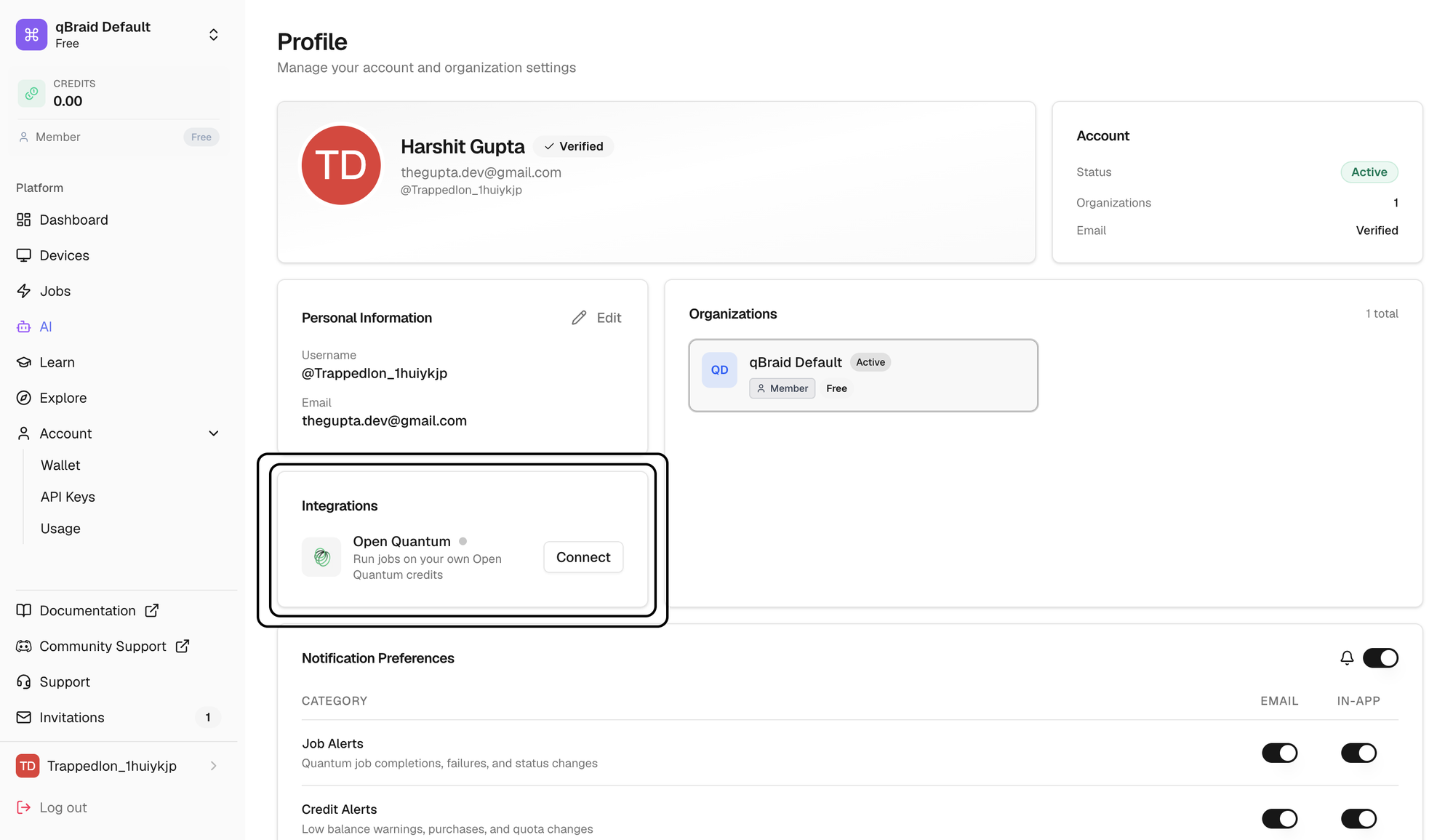
You manage the connection from the Integrations tile on your Profile page.
The Integrations tile on your Profile page.
You need an Open Quantum account before you
can connect. It doesn’t have to match the email you use for qBraid, any Open
Quantum account works.
Create your Open Quantum account
Set up Open Quantum first, so the account exists when you connect it to qBraid.
Sign up for an Open Quantum account. Google sign-in is supported.
3
Finish sign-up
Complete any remaining onboarding steps on the Open Quantum side.
Claim your free Spark credits
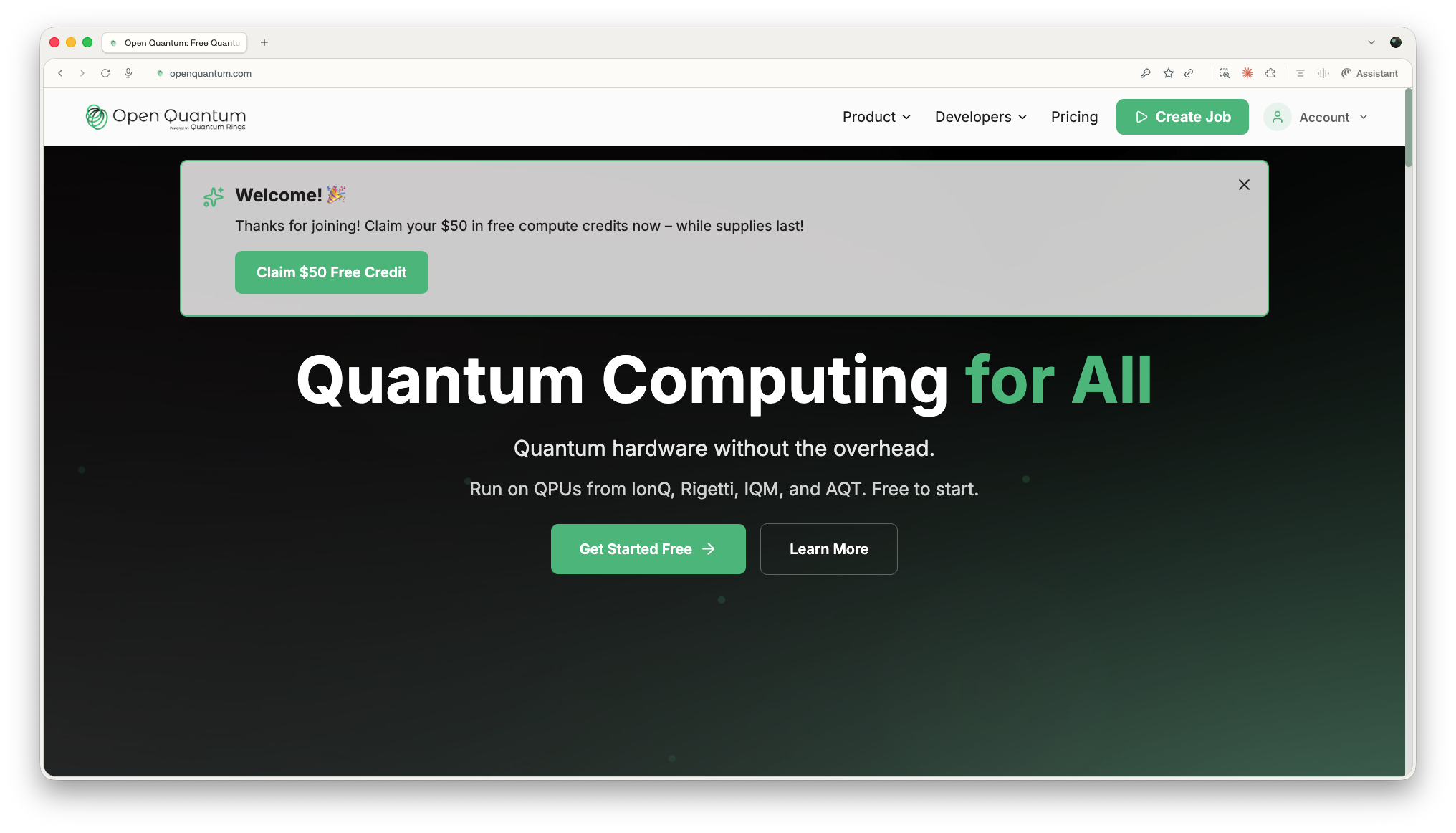
When you sign in to your new Open Quantum account, a welcome banner greets you
with an offer of free compute credits, while supplies last. Click Claim $50
Free Credit to add them to your Open Quantum account. These arrive as Spark
credits, Open Quantum’s free and promotional credits, which
expire 90 days after they’re
granted.
The welcome banner on openquantum.com with the Claim $50 Free Credit button.
Once you connect your account to qBraid below, jobs you submit to Open Quantum
devices through qBraid are billed against these credits.
Click your name and avatar at the bottom of the sidebar, or use Account >
Profile.
3
Find the Integrations tile
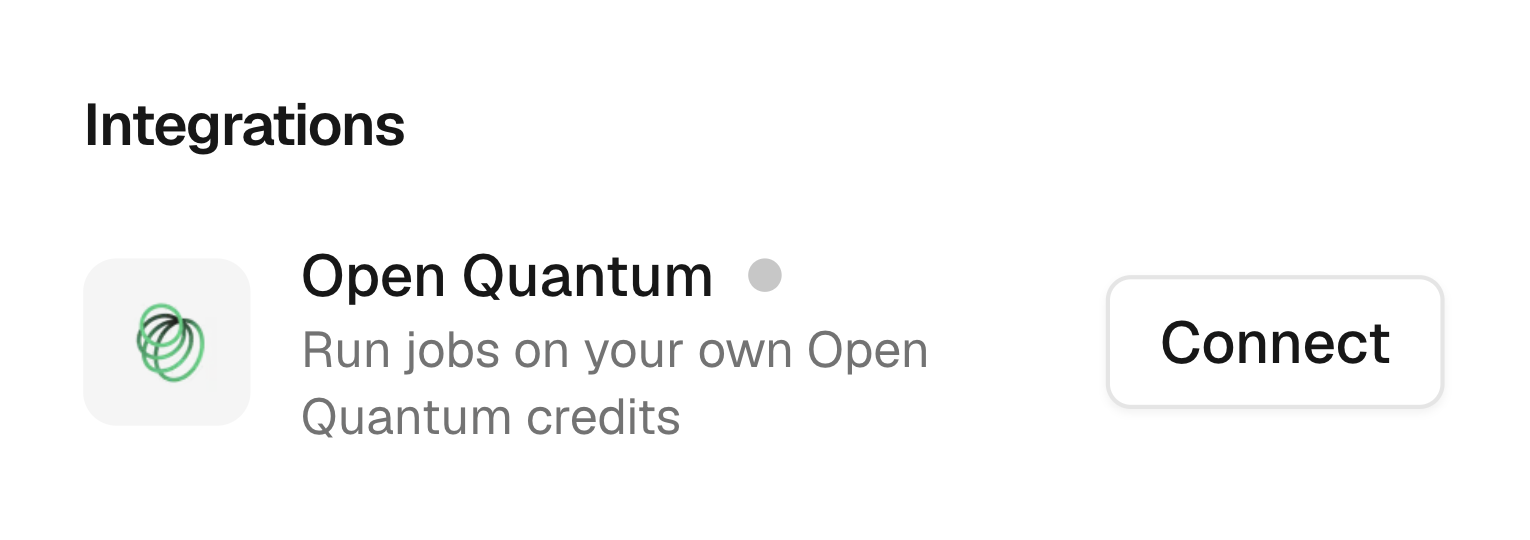
Scroll down to the Integrations tile, below Personal Information. A grey
dot next to Open Quantum means it isn’t connected yet.
Before connecting: a grey status dot and a Connect button.
4
Click Connect
This opens the Open Quantum authentication window.
5
Sign in on the Open Quantum side
Sign in with your Open Quantum account. The window closes automatically once
you’re authenticated.
Confirm the connection
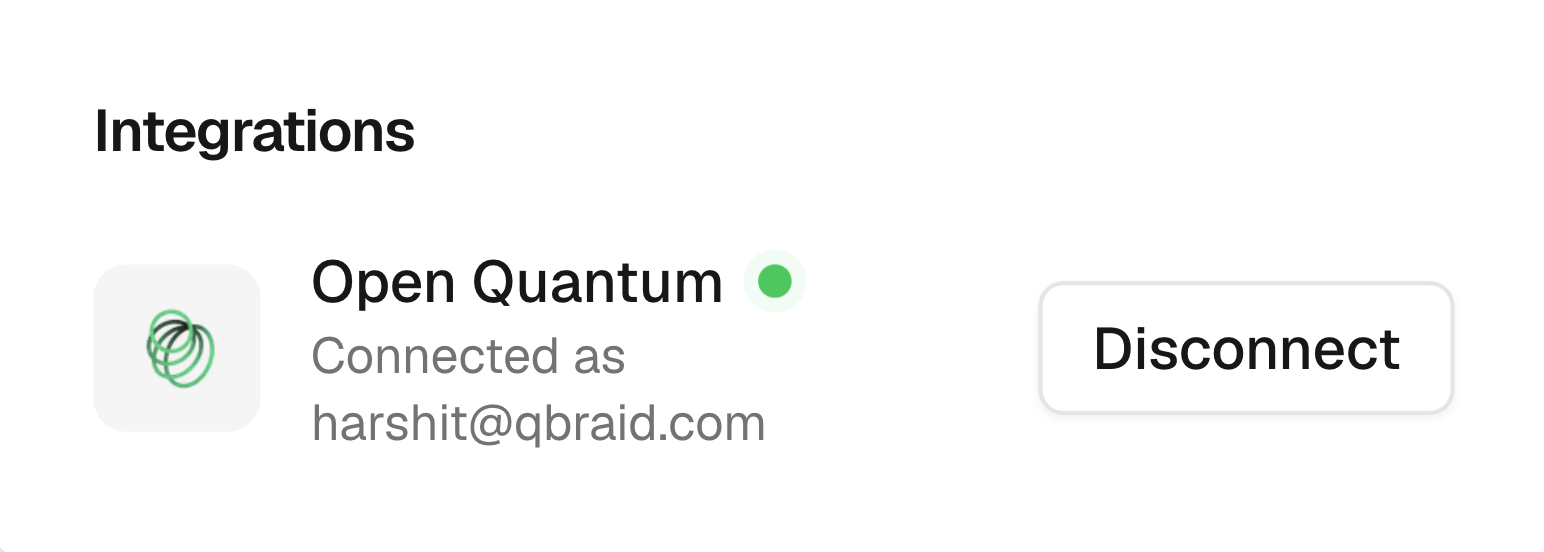
Back on the Profile page, the Open Quantum entry now shows a green
Connected dot along with the account you’re connected as. That’s it, jobs
submitted to Open Quantum devices will now run on your Open Quantum credits.
After connecting: a green Connected dot and a Disconnect button.
Disconnect Open Quantum
To end the integration, open the Integrations tile and click Disconnect
next to Open Quantum. Once disconnected, you can no longer run jobs on
Open Quantum devices until you connect again, since those jobs can only be paid
for with your Open Quantum credits.
Troubleshooting
Insufficient Open Quantum credits
This is the most common error. It means your Open Quantum balance can’t
cover the job, usually for one of these reasons:
You never claimed the $50 of free Spark credits offered when you signed up.
You’ve spent the credits you had.
Your credits expired before you used them.
You’re waiting on your next Promotional Credits refill.
Check your balance on the Open Quantum billing
page. Credit Balance
shows your Spark and Full credits separately, along with the date
your earliest Spark credits expire. Spark credits are the free and
promotional ones, and expire 90 days after they’re granted; Full credits are
the ones you purchase, and expire after 12 months. Jobs spend your Spark
credits first, then your Full credits. Credit Transactions below it
itemizes every consumption, promotion, and expiration, so you can see
exactly where your credits went.To top up, click Add Credits to reach the Buy
Credits page, where you can
purchase Full credits in bundles. Otherwise, wait for your next Promotional
Credits refill.
My jobs still fail after connecting
Open the Integrations tile and confirm Open Quantum shows a green
Connected dot. If it’s grey, click Connect and finish signing in on
the Open Quantum side. Also check that your Open Quantum account has credits
available.
The Connect button doesn't open a window
Check that your browser isn’t blocking pop-ups for account.qbraid.com,
then try again.
I still need help
Reach out from the Support link in the sidebar and we’ll take a look at
your job history.
{"docsConfig":{"theme":"mint","$schema":"https://mintlify.com/docs.json","name":"qBraid","description":"Official documentation for qBraid, the quantum computing platform: Lab (cloud IDE), Runtime (SDK, CLI, and REST API), and 20+ QPUs and simulators from 11 providers, unified behind one account and credit system.","colors":{"primary":"#6d3fd6","light":"#9f6cff","dark":"#0a0a0b"},"logo":{"light":"https://mintcdn.com/qbraidco/MWMLuPZDp_BcNo9C/_static/logo.png?fit=max\u0026auto=format\u0026n=MWMLuPZDp_BcNo9C\u0026q=85\u0026s=96d4240582ef0f2dc313ddc7d324c5d7","dark":"https://mintcdn.com/qbraidco/oaKSHMFAnH5HdzF8/_static/logo-dark.png?fit=max\u0026auto=format\u0026n=oaKSHMFAnH5HdzF8\u0026q=85\u0026s=bfe5e30f1da137a470b8b16bf3f91c58"},"favicon":"https://mintcdn.com/qbraidco/MWMLuPZDp_BcNo9C/_static/favicon.png?fit=max\u0026auto=format\u0026n=MWMLuPZDp_BcNo9C\u0026q=85\u0026s=866b6073222b6f7a37fd133b5bf06671","api":{"openapi":["openapi-v2.json"]},"appearance":{"default":"dark"},"background":{"color":{"light":"#f4f3ee","dark":"#0a0a0b"}},"navbar":{"primary":{"type":"button","label":"START NOW","href":"https://account.qbraid.com/"}},"footer":{"socials":{"x":"https://x.com/qbraid_official","linkedin":"https://www.linkedin.com/company/qbraid-official","youtube":"https://www.youtube.com/@qbraidofficial"}},"seo":{"organization":{"name":"qBraid","url":"https://qbraid.com","sameAs":["https://github.com/qBraid","https://www.linkedin.com/company/qbraid-official","https://x.com/qbraid_official","https://discord.gg/9jpmpeEV65"]}},"fonts":{"heading":{"family":"Space Grotesk"},"body":{"family":"Space Grotesk"}},"styling":{"codeblocks":"dark","latex":false},"integrations":{},"contextual":{"options":["copy","view","chatgpt","claude","perplexity","mcp","cursor","vscode"],"display":"header"},"markdown":{"instructions":["Prefer the qBraid CLI for programmatic platform actions: pip install 'qbraid-cli>=0.12', then run `qbraid configure` once with an API key from https://account.qbraid.com/account/api-keys.","Always install the latest packages (pip install -U qbraid qbraid-cli); do not pin versions from memory. qbraid-cli below 0.12.0 is incompatible with the current API.","Device IDs use the QRN format vendor:provider:type:name (e.g. qbraid:qbraid:sim:qir-sv, rigetti:rigetti:qpu:cepheus-1-108q). Legacy underscore IDs are deprecated.","The REST API base URL is https://api-v2.qbraid.com/api/v1, authenticated with an X-API-Key header.","Free simulators cost no credits; QPU and GPU jobs consume credits. Surface the estimated cost to the user before submitting a paid job.","For account signup, API keys, credits, and end-to-end action recipes, see https://qbraid.com/llms.txt."]},"navigation":{"pages":[]}},"deployment":{"deploymentMetadataValue":{"subdomain":"qbraidco","hasAudioNarration":false,"actualSubdomain":"qbraidco","customDomains":[],"gitSource":{"type":"github","owner":"qbraid","repo":"docs","deployBranch":"mintlify-live","contentDirectory":"","isPrivate":true,"mountPath":"","label":""},"feedback":{"thumbs":true,"agentFeedback":true},"entitlements":{"AI_CHAT":{"status":"DISABLED"},"WEB_MCP":{"status":"DISABLED"},"NARRATION":{"status":"DISABLED"}},"buildId":"6abef6744c467cea2ee81621","clientVersion":"0.0.4143","searchFilterCounts":[{"language":"default","tag":"Documentation","count":127},{"language":"default","tag":"User Guide","count":67},{"language":"default","tag":"SDK","count":25},{"language":"default","tag":"API Reference","count":21},{"language":"default","tag":"ACCOUNT","count":19},{"language":"default","tag":"CLI","count":19},{"language":"default","tag":"LAB","count":16},{"language":"default","tag":"Providers","count":15},{"language":"default","tag":"APIs","count":12},{"language":"default","tag":"Organizations","count":9}]},"assistantConfig":{"enableStarterQuestions":true,"deflection":{"enabled":true,"email":"contact@qbraid.com","showHelpButton":true}},"basePath":"","hasChatPermissions":false,"hasWebMcpPermissions":false,"toggles":[{"name":"kill-isr","enabled":true,"variant":{"name":"disabled","enabled":false,"feature_enabled":true},"impressionData":false},{"name":"custom-rbac-roles","enabled":true,"variant":{"name":"disabled","enabled":false,"feature_enabled":true},"impressionData":false},{"name":"agent-mintlify-slack","enabled":true,"variant":{"name":"disabled","enabled":false,"feature_enabled":true},"impressionData":false},{"name":"agent-integrations-settings","enabled":true,"variant":{"name":"disabled","enabled":false,"feature_enabled":true},"impressionData":false},{"name":"rbac-expansion","enabled":true,"variant":{"name":"disabled","enabled":false,"feature_enabled":true},"impressionData":false},{"name":"automations-pr-grouping","enabled":true,"variant":{"name":"disabled","enabled":false,"feature_enabled":true},"impressionData":false},{"name":"custom-prefix","enabled":true,"variant":{"name":"disabled","enabled":false,"feature_enabled":true},"impressionData":false},{"name":"analytics-v7","enabled":true,"variant":{"name":"disabled","enabled":false,"feature_enabled":true},"impressionData":false},{"name":"user-flows-analytics","enabled":true,"variant":{"name":"disabled","enabled":false,"feature_enabled":true},"impressionData":false},{"name":"no-publish-flow","enabled":true,"variant":{"name":"disabled","enabled":false,"feature_enabled":true},"impressionData":false},{"name":"workos-onboarding","enabled":true,"variant":{"name":"disabled","enabled":false,"feature_enabled":true},"impressionData":false},{"name":"snapshot-serving-live","enabled":true,"variant":{"name":"disabled","enabled":false,"feature_enabled":true},"impressionData":false},{"name":"stripTemperatureMiddleware","enabled":true,"variant":{"name":"disabled","enabled":false,"feature_enabled":true},"impressionData":false},{"name":"support-platform-pylon-zendesk","enabled":true,"variant":{"name":"disabled","enabled":false,"feature_enabled":true},"impressionData":false},{"name":"snapshot-serving","enabled":true,"variant":{"name":"disabled","enabled":false,"feature_enabled":true},"impressionData":false},{"name":"instant-rollback","enabled":true,"variant":{"name":"disabled","enabled":false,"feature_enabled":true},"impressionData":false},{"name":"granular-notifications-server","enabled":true,"variant":{"name":"disabled","enabled":false,"feature_enabled":true},"impressionData":false},{"name":"granular-notifications","enabled":true,"variant":{"name":"disabled","enabled":false,"feature_enabled":true},"impressionData":false},{"name":"automations-fable","enabled":true,"variant":{"name":"disabled","enabled":false,"feature_enabled":true},"impressionData":false},{"name":"fixed-ai-action-pricing","enabled":true,"variant":{"name":"disabled","enabled":false,"feature_enabled":true},"impressionData":false},{"name":"automation-resolve-merge-conflict","enabled":true,"variant":{"name":"disabled","enabled":false,"feature_enabled":true},"impressionData":false},{"name":"scoped-publishing","enabled":true,"variant":{"name":"disabled","enabled":false,"feature_enabled":true},"impressionData":false},{"name":"mintql","enabled":true,"variant":{"name":"disabled","enabled":false,"feature_enabled":true},"impressionData":false},{"name":"page-level-analytics","enabled":true,"variant":{"name":"disabled","enabled":false,"feature_enabled":true},"impressionData":false},{"name":"editor-version-history-v2","enabled":true,"variant":{"name":"disabled","enabled":false,"feature_enabled":true},"impressionData":false},{"name":"billing-page-v2","enabled":true,"variant":{"name":"disabled","enabled":false,"feature_enabled":true},"impressionData":false},{"name":"full-page-search","enabled":true,"variant":{"name":"disabled","enabled":false,"feature_enabled":true},"impressionData":false},{"name":"workspace-projects","enabled":true,"variant":{"name":"disabled","enabled":false,"feature_enabled":true},"impressionData":false},{"name":"assistant-v5","enabled":true,"variant":{"name":"disabled","enabled":false,"feature_enabled":true},"impressionData":false},{"name":"fork-pr-previews","enabled":true,"variant":{"name":"disabled","enabled":false,"feature_enabled":true},"impressionData":false},{"name":"revalidation-jwt","enabled":true,"variant":{"name":"disabled","enabled":false,"feature_enabled":true},"impressionData":false},{"name":"workos-sso-scim","enabled":true,"variant":{"name":"disabled","enabled":false,"feature_enabled":true},"impressionData":false},{"name":"hobby-abuse-scan","enabled":true,"variant":{"name":"disabled","enabled":false,"feature_enabled":true},"impressionData":false},{"name":"dashboard-inbox","enabled":true,"variant":{"name":"disabled","enabled":false,"feature_enabled":true},"impressionData":false},{"name":"workos-signup","enabled":true,"variant":{"name":"disabled","enabled":false,"feature_enabled":true},"impressionData":false},{"name":"turbopuffer-dual-write","enabled":true,"variant":{"name":"disabled","enabled":false,"feature_enabled":true},"impressionData":false},{"name":"workos-enabled","enabled":true,"variant":{"name":"disabled","enabled":false,"feature_enabled":true},"impressionData":false},{"name":"approve-review-flow","enabled":true,"variant":{"name":"disabled","enabled":false,"feature_enabled":true},"impressionData":false},{"name":"editor-metadata","enabled":true,"variant":{"name":"disabled","enabled":false,"feature_enabled":true},"impressionData":false},{"name":"sso-setup-deadline-banner","enabled":true,"variant":{"name":"disabled","enabled":false,"feature_enabled":true},"impressionData":false},{"name":"turbopuffer-serve","enabled":true,"variant":{"name":"disabled","enabled":false,"feature_enabled":true},"impressionData":false},{"name":"live-agents","enabled":true,"variant":{"name":"disabled","enabled":false,"feature_enabled":true},"impressionData":false},{"name":"llms-txt-v2","enabled":true,"variant":{"name":"disabled","enabled":false,"feature_enabled":true},"impressionData":false}],"starterQuestions":[{"_id":"698bbb67e0c4d028d9b94ffe","deploymentId":"6616dbe4a537d328fd088844","questionText":"What AI integrations does qBraid offer?","status":"active","generatedBy":"manual","createdAt":"2026-02-10T23:12:39.122Z","updatedAt":"2026-02-10T23:12:39.122Z","__v":0},{"_id":"698bba86e0c4d028d9b94cb0","deploymentId":"6616dbe4a537d328fd088844","questionText":"How do I launch a qBraid Lab GPU instance?","status":"active","generatedBy":"manual","createdAt":"2026-02-10T23:08:54.001Z","updatedAt":"2026-02-10T23:13:41.714Z","__v":0},{"_id":"698bba66e0c4d028d9b94c5a","deploymentId":"6616dbe4a537d328fd088844","questionText":"How can I submit a quantum job to a QPU using qBraid credits?","status":"active","generatedBy":"manual","createdAt":"2026-02-10T23:08:22.342Z","updatedAt":"2026-02-10T23:13:57.413Z","__v":0}],"googleFontsInlined":true},"customCss":[{"filePath":"styles.css","content":"/* cyrillic-ext */\n@font-face {\n font-family: 'JetBrains Mono';\n font-style: normal;\n font-weight: 400;\n font-display: swap;\n src: url(/_mintlify/assets/fonts/google/s/jetbrainsmono/v24/tDbv2o-flEEny0FZhsfKu5WU4zr3E_BX0PnT8RD8yKwBNntkaToggR7BYRbKPx3cwhsk.woff2) format('woff2');\n unicode-range: U+0460-052F, U+1C80-1C8A, U+20B4, U+2DE0-2DFF, U+A640-A69F, U+FE2E-FE2F;\n}\n/* cyrillic */\n@font-face {\n font-family: 'JetBrains Mono';\n font-style: normal;\n font-weight: 400;\n font-display: swap;\n src: url(/_mintlify/assets/fonts/google/s/jetbrainsmono/v24/tDbv2o-flEEny0FZhsfKu5WU4zr3E_BX0PnT8RD8yKwBNntkaToggR7BYRbKPxTcwhsk.woff2) format('woff2');\n unicode-range: U+0301, U+0400-045F, U+0490-0491, U+04B0-04B1, U+2116;\n}\n/* greek */\n@font-face {\n font-family: 'JetBrains Mono';\n font-style: normal;\n font-weight: 400;\n font-display: swap;\n src: url(/_mintlify/assets/fonts/google/s/jetbrainsmono/v24/tDbv2o-flEEny0FZhsfKu5WU4zr3E_BX0PnT8RD8yKwBNntkaToggR7BYRbKPxPcwhsk.woff2) format('woff2');\n unicode-range: U+0370-0377, U+037A-037F, U+0384-038A, U+038C, U+038E-03A1, U+03A3-03FF;\n}\n/* vietnamese */\n@font-face {\n font-family: 'JetBrains Mono';\n font-style: normal;\n font-weight: 400;\n font-display: swap;\n src: url(/_mintlify/assets/fonts/google/s/jetbrainsmono/v24/tDbv2o-flEEny0FZhsfKu5WU4zr3E_BX0PnT8RD8yKwBNntkaToggR7BYRbKPx_cwhsk.woff2) format('woff2');\n unicode-range: U+0102-0103, U+0110-0111, U+0128-0129, U+0168-0169, U+01A0-01A1, U+01AF-01B0, U+0300-0301, U+0303-0304, U+0308-0309, U+0323, U+0329, U+1EA0-1EF9, U+20AB;\n}\n/* latin-ext */\n@font-face {\n font-family: 'JetBrains Mono';\n font-style: normal;\n font-weight: 400;\n font-display: swap;\n src: url(/_mintlify/assets/fonts/google/s/jetbrainsmono/v24/tDbv2o-flEEny0FZhsfKu5WU4zr3E_BX0PnT8RD8yKwBNntkaToggR7BYRbKPx7cwhsk.woff2) format('woff2');\n unicode-range: U+0100-02BA, U+02BD-02C5, U+02C7-02CC, U+02CE-02D7, U+02DD-02FF, U+0304, U+0308, U+0329, U+1D00-1DBF, U+1E00-1E9F, U+1EF2-1EFF, U+2020, U+20A0-20AB, U+20AD-20C4, U+2113, U+2C60-2C7F, U+A720-A7FF;\n}\n/* latin */\n@font-face {\n font-family: 'JetBrains Mono';\n font-style: normal;\n font-weight: 400;\n font-display: swap;\n src: url(/_mintlify/assets/fonts/google/s/jetbrainsmono/v24/tDbv2o-flEEny0FZhsfKu5WU4zr3E_BX0PnT8RD8yKwBNntkaToggR7BYRbKPxDcwg.woff2) format('woff2');\n unicode-range: U+0000-00FF, U+0131, U+0152-0153, U+02BB-02BC, U+02C6, U+02DA, U+02DC, U+0304, U+0308, U+0329, U+2000-206F, U+20AC, U+2122, U+2191, U+2193, U+2212, U+2215, U+FEFF, U+FFFD;\n}\n/* cyrillic-ext */\n@font-face {\n font-family: 'JetBrains Mono';\n font-style: normal;\n font-weight: 500;\n font-display: swap;\n src: url(/_mintlify/assets/fonts/google/s/jetbrainsmono/v24/tDbv2o-flEEny0FZhsfKu5WU4zr3E_BX0PnT8RD8yKwBNntkaToggR7BYRbKPx3cwhsk.woff2) format('woff2');\n unicode-range: U+0460-052F, U+1C80-1C8A, U+20B4, U+2DE0-2DFF, U+A640-A69F, U+FE2E-FE2F;\n}\n/* cyrillic */\n@font-face {\n font-family: 'JetBrains Mono';\n font-style: normal;\n font-weight: 500;\n font-display: swap;\n src: url(/_mintlify/assets/fonts/google/s/jetbrainsmono/v24/tDbv2o-flEEny0FZhsfKu5WU4zr3E_BX0PnT8RD8yKwBNntkaToggR7BYRbKPxTcwhsk.woff2) format('woff2');\n unicode-range: U+0301, U+0400-045F, U+0490-0491, U+04B0-04B1, U+2116;\n}\n/* greek */\n@font-face {\n font-family: 'JetBrains Mono';\n font-style: normal;\n font-weight: 500;\n font-display: swap;\n src: url(/_mintlify/assets/fonts/google/s/jetbrainsmono/v24/tDbv2o-flEEny0FZhsfKu5WU4zr3E_BX0PnT8RD8yKwBNntkaToggR7BYRbKPxPcwhsk.woff2) format('woff2');\n unicode-range: U+0370-0377, U+037A-037F, U+0384-038A, U+038C, U+038E-03A1, U+03A3-03FF;\n}\n/* vietnamese */\n@font-face {\n font-family: 'JetBrains Mono';\n font-style: normal;\n font-weight: 500;\n font-display: swap;\n src: url(/_mintlify/assets/fonts/google/s/jetbrainsmono/v24/tDbv2o-flEEny0FZhsfKu5WU4zr3E_BX0PnT8RD8yKwBNntkaToggR7BYRbKPx_cwhsk.woff2) format('woff2');\n unicode-range: U+0102-0103, U+0110-0111, U+0128-0129, U+0168-0169, U+01A0-01A1, U+01AF-01B0, U+0300-0301, U+0303-0304, U+0308-0309, U+0323, U+0329, U+1EA0-1EF9, U+20AB;\n}\n/* latin-ext */\n@font-face {\n font-family: 'JetBrains Mono';\n font-style: normal;\n font-weight: 500;\n font-display: swap;\n src: url(/_mintlify/assets/fonts/google/s/jetbrainsmono/v24/tDbv2o-flEEny0FZhsfKu5WU4zr3E_BX0PnT8RD8yKwBNntkaToggR7BYRbKPx7cwhsk.woff2) format('woff2');\n unicode-range: U+0100-02BA, U+02BD-02C5, U+02C7-02CC, U+02CE-02D7, U+02DD-02FF, U+0304, U+0308, U+0329, U+1D00-1DBF, U+1E00-1E9F, U+1EF2-1EFF, U+2020, U+20A0-20AB, U+20AD-20C4, U+2113, U+2C60-2C7F, U+A720-A7FF;\n}\n/* latin */\n@font-face {\n font-family: 'JetBrains Mono';\n font-style: normal;\n font-weight: 500;\n font-display: swap;\n src: url(/_mintlify/assets/fonts/google/s/jetbrainsmono/v24/tDbv2o-flEEny0FZhsfKu5WU4zr3E_BX0PnT8RD8yKwBNntkaToggR7BYRbKPxDcwg.woff2) format('woff2');\n unicode-range: U+0000-00FF, U+0131, U+0152-0153, U+02BB-02BC, U+02C6, U+02DA, U+02DC, U+0304, U+0308, U+0329, U+2000-206F, U+20AC, U+2122, U+2191, U+2193, U+2212, U+2215, U+FEFF, U+FFFD;\n}\n:root{--qb-bg: #0a0a0b;--qb-fg: #ece9e0;--qb-accent: #9f6cff;--qb-accent-soft: rgba(159, 108, 255, 0.14);--qb-paper: #f4f3ee;--qb-ink: #111114}h1,h2,h3,h4{font-weight:400;letter-spacing:-0.02em}pre,pre *,code,kbd,samp{font-family:\"JetBrains Mono\", ui-monospace, SFMono-Regular, Menlo, monospace!important}::selection{background:var(--qb-accent-soft)}td:nth-child(2){width:200px}@media (min-width: 1024px){:root{--mintlify-slot-header-height: 7rem}}"}],"page":{"pagePath":"v2/account/integrations/openquantum","slug":"/v2/account/integrations/openquantum","pageMetadata":{"title":"Open Quantum","description":"Connect your Open Quantum account to qBraid to run quantum jobs on your own Open Quantum credits.","href":"/v2/account/integrations/openquantum"},"description":{"compiledSource":"\"use strict\";\nconst {jsx: _jsx} = arguments[0];\nconst {useMDXComponents: _provideComponents} = arguments[0];\nfunction _createMdxContent(props) {\n const _components = {\n p: \"p\",\n ..._provideComponents(),\n ...props.components\n };\n return _jsx(_components.p, {\n children: \"Connect your Open Quantum account to qBraid to run quantum jobs on your own Open Quantum credits.\"\n });\n}\nfunction MDXContent(props = {}) {\n const {wrapper: MDXLayout} = {\n ..._provideComponents(),\n ...props.components\n };\n return MDXLayout ? _jsx(MDXLayout, {\n ...props,\n children: _jsx(_createMdxContent, {\n ...props\n })\n }) : _createMdxContent(props);\n}\nreturn {\n default: MDXContent\n};\n","frontmatter":{},"scope":{}},"pageType":"default","mdx":{"mdxSource":{"compiledSource":"\"use strict\";const{Fragment:_Fragment,jsx:_jsx,jsxs:_jsxs}=arguments[0];const{useMDXComponents:_provideComponents}=arguments[0];function _createMdxContent(props){const _components={a:`a`,code:`code`,li:`li`,p:`p`,strong:`strong`,ul:`ul`,..._provideComponents(),...props.components},{Accordion,AccordionGroup,Frame,Heading,Note,OptimizedImage,Step,Steps,Warning}=_components;if(!Accordion)_missingMdxReference(`Accordion`,true);if(!AccordionGroup)_missingMdxReference(`AccordionGroup`,true);if(!Frame)_missingMdxReference(`Frame`,true);if(!Heading)_missingMdxReference(`Heading`,true);if(!Note)_missingMdxReference(`Note`,true);if(!OptimizedImage)_missingMdxReference(`OptimizedImage`,true);if(!Step)_missingMdxReference(`Step`,true);if(!Steps)_missingMdxReference(`Steps`,true);if(!Warning)_missingMdxReference(`Warning`,true);return _jsxs(_Fragment,{children:[_jsxs(_components.p,{children:[`The Open Quantum integration lets you run quantum jobs on Open Quantum devices through qBraid, paid for with your own `,_jsx(_components.a,{href:`https://www.openquantum.com/`,children:`Open Quantum`}),` credits. Open Quantum devices can only be billed to Open Quantum credits, so you need to connect your Open Quantum account before you can run jobs on them.`]}),`\n`,_jsx(Warning,{children:_jsxs(_components.p,{children:[_jsx(_components.strong,{children:`“Free” means free of qBraid credits, not free of charge.`}),` Open Quantum\ndevices are listed as free on qBraid because running a job on one costs you no\nqBraid credits. The job is instead billed to the Open Quantum account you\nconnect below, drawing down that account’s credit balance. You can top that\nbalance up by buying credits, or claim `,_jsx(_components.a,{href:`#claim-your-free-spark-credits`,children:`free Spark\ncredits`}),` through Open Quantum’s promotional\nofferings.`]})}),`\n`,_jsxs(_components.p,{children:[`You manage the connection from the `,_jsx(_components.strong,{children:`Integrations`}),` tile on your `,_jsx(_components.a,{href:`https://account.qbraid.com/account/profile`,children:`Profile page`}),`.`]}),`\n`,_jsx(Frame,{caption:`The Integrations tile on your Profile page.`,children:_jsx(OptimizedImage,{src:`https://storage.googleapis.com/qbraid-static-assets/qbraid-docs/account/openquantum-profile-page.png`,alt:`qBraid Profile page with the Integrations tile highlighted`})}),`\n`,_jsx(Note,{children:_jsxs(_components.p,{children:[`You need an `,_jsx(_components.a,{href:`https://www.openquantum.com/`,children:`Open Quantum`}),` account before you\ncan connect. It doesn’t have to match the email you use for qBraid, any Open\nQuantum account works.`]})}),`\n`,_jsx(Heading,{level:`2`,id:`create-your-open-quantum-account`,children:`Create your Open Quantum account`}),`\n`,_jsx(_components.p,{children:`Set up Open Quantum first, so the account exists when you connect it to qBraid.`}),`\n`,_jsxs(Steps,{children:[_jsx(Step,{title:`Go to Open Quantum`,children:_jsxs(_components.p,{children:[`Open `,_jsx(_components.a,{href:`https://www.openquantum.com/`,children:`openquantum.com`}),`.`]})}),_jsx(Step,{title:`Create an account`,children:_jsx(_components.p,{children:`Sign up for an Open Quantum account. Google sign-in is supported.`})}),_jsx(Step,{title:`Finish sign-up`,children:_jsx(_components.p,{children:`Complete any remaining onboarding steps on the Open Quantum side.`})})]}),`\n`,_jsx(Heading,{level:`2`,id:`claim-your-free-spark-credits`,children:`Claim your free Spark credits`}),`\n`,_jsxs(_components.p,{children:[`When you sign in to your new Open Quantum account, a welcome banner greets you\nwith an offer of free compute credits, while supplies last. Click `,_jsx(_components.strong,{children:`Claim $50\nFree Credit`}),` to add them to your Open Quantum account. These arrive as `,_jsx(_components.strong,{children:`Spark`}),`\ncredits, Open Quantum’s free and promotional credits, which\n`,_jsx(_components.a,{href:`https://docs.openquantum.com/concepts/credits/`,children:`expire`}),` 90 days after they’re\ngranted.`]}),`\n`,_jsx(Frame,{caption:`The welcome banner on openquantum.com with the Claim $50 Free Credit button.`,children:_jsx(OptimizedImage,{src:`https://storage.googleapis.com/qbraid-static-assets/qbraid-docs/account/openquantum-free-credits.png`,alt:`Open Quantum homepage showing a welcome banner with a Claim $50 Free Credit button`})}),`\n`,_jsx(_components.p,{children:`Once you connect your account to qBraid below, jobs you submit to Open Quantum\ndevices through qBraid are billed against these credits.`}),`\n`,_jsx(Heading,{level:`2`,id:`connect-open-quantum-to-qbraid`,children:`Connect Open Quantum to qBraid`}),`\n`,_jsxs(Steps,{children:[_jsx(Step,{title:`Sign in to qBraid`,children:_jsxs(_components.p,{children:[`Go to `,_jsx(_components.a,{href:`https://account.qbraid.com/`,children:`account.qbraid.com`}),` and sign in.`]})}),_jsx(Step,{title:`Open your Profile`,children:_jsxs(_components.p,{children:[`Click your name and avatar at the bottom of the sidebar, or use `,_jsx(_components.strong,{children:`Account >\nProfile`}),`.`]})}),_jsxs(Step,{title:`Find the Integrations tile`,children:[_jsxs(_components.p,{children:[`Scroll down to the `,_jsx(_components.strong,{children:`Integrations`}),` tile, below Personal Information. A grey\ndot next to `,_jsx(_components.strong,{children:`Open Quantum`}),` means it isn’t connected yet.`]}),_jsx(`div`,{style:{maxWidth:`75%`,margin:`0 auto`},children:_jsx(Frame,{caption:`Before connecting: a grey status dot and a Connect button.`,children:_jsx(OptimizedImage,{src:`https://storage.googleapis.com/qbraid-static-assets/qbraid-docs/account/openquantum-integration-tile-disconnected.png`,alt:`Open Quantum tile showing a grey status dot and a Connect button`,style:{borderRadius:`12px`}})})})]}),_jsx(Step,{title:`Click Connect`,children:_jsx(_components.p,{children:`This opens the Open Quantum authentication window.`})}),_jsx(Step,{title:`Sign in on the Open Quantum side`,children:_jsx(_components.p,{children:`Sign in with your Open Quantum account. The window closes automatically once\nyou’re authenticated.`})})]}),`\n`,_jsx(Heading,{level:`2`,id:`confirm-the-connection`,children:`Confirm the connection`}),`\n`,_jsxs(_components.p,{children:[`Back on the Profile page, the `,_jsx(_components.strong,{children:`Open Quantum`}),` entry now shows a green\n`,_jsx(_components.strong,{children:`Connected`}),` dot along with the account you’re connected as. That’s it, jobs\nsubmitted to Open Quantum devices will now run on your Open Quantum credits.`]}),`\n`,_jsx(`div`,{style:{maxWidth:`75%`,margin:`0 auto`},children:_jsx(Frame,{caption:`After connecting: a green Connected dot and a Disconnect button.`,children:_jsx(OptimizedImage,{src:`https://storage.googleapis.com/qbraid-static-assets/qbraid-docs/account/openquantum-integration-tile-connected.png`,alt:`Open Quantum tile showing a green Connected dot, the connected account, and a Disconnect button`,style:{borderRadius:`12px`}})})}),`\n`,_jsx(Heading,{level:`2`,id:`disconnect-open-quantum`,children:`Disconnect Open Quantum`}),`\n`,_jsxs(_components.p,{children:[`To end the integration, open the `,_jsx(_components.strong,{children:`Integrations`}),` tile and click `,_jsx(_components.strong,{children:`Disconnect`}),`\nnext to `,_jsx(_components.strong,{children:`Open Quantum`}),`. Once disconnected, you can no longer run jobs on\nOpen Quantum devices until you connect again, since those jobs can only be paid\nfor with your Open Quantum credits.`]}),`\n`,_jsx(Heading,{level:`2`,id:`troubleshooting`,children:`Troubleshooting`}),`\n`,_jsxs(AccordionGroup,{children:[_jsxs(Accordion,{title:`Insufficient Open Quantum credits`,icon:`coins`,id:`insufficient-open-quantum-credits`,children:[_jsx(_components.p,{children:`This is the most common error. It means your Open Quantum balance can’t\ncover the job, usually for one of these reasons:`}),_jsxs(_components.ul,{children:[`\n`,_jsx(_components.li,{children:`You never claimed the $50 of free Spark credits offered when you signed up.`}),`\n`,_jsx(_components.li,{children:`You’ve spent the credits you had.`}),`\n`,_jsx(_components.li,{children:`Your credits expired before you used them.`}),`\n`,_jsx(_components.li,{children:`You’re waiting on your next Promotional Credits refill.`}),`\n`]}),_jsxs(_components.p,{children:[`Check your balance on the `,_jsx(_components.a,{href:`https://www.openquantum.com/settings/billing`,children:`Open Quantum billing\npage`}),`. `,_jsx(_components.strong,{children:`Credit Balance`}),`\nshows your `,_jsx(_components.strong,{children:`Spark`}),` and `,_jsx(_components.strong,{children:`Full`}),` credits separately, along with the date\nyour earliest Spark credits expire. Spark credits are the free and\npromotional ones, and expire 90 days after they’re granted; Full credits are\nthe ones you purchase, and expire after 12 months. Jobs spend your Spark\ncredits first, then your Full credits. `,_jsx(_components.strong,{children:`Credit Transactions`}),` below it\nitemizes every consumption, promotion, and expiration, so you can see\nexactly where your credits went.`]}),_jsxs(_components.p,{children:[`To top up, click `,_jsx(_components.strong,{children:`Add Credits`}),` to reach the `,_jsx(_components.a,{href:`https://www.openquantum.com/buy-credits`,children:`Buy\nCredits`}),` page, where you can\npurchase Full credits in bundles. Otherwise, wait for your next Promotional\nCredits refill.`]})]}),_jsx(Accordion,{title:`My jobs still fail after connecting`,icon:`triangle-exclamation`,id:`my-jobs-still-fail-after-connecting`,children:_jsxs(_components.p,{children:[`Open the `,_jsx(_components.strong,{children:`Integrations`}),` tile and confirm `,_jsx(_components.strong,{children:`Open Quantum`}),` shows a green\n`,_jsx(_components.strong,{children:`Connected`}),` dot. If it’s grey, click `,_jsx(_components.strong,{children:`Connect`}),` and finish signing in on\nthe Open Quantum side. Also check that your Open Quantum account has credits\navailable.`]})}),_jsx(Accordion,{title:`The Connect button doesn't open a window`,icon:`window-restore`,id:`the-connect-button-doesnt-open-a-window`,children:_jsxs(_components.p,{children:[`Check that your browser isn’t blocking pop-ups for `,_jsx(_components.code,{children:`account.qbraid.com`}),`,\nthen try again.`]})}),_jsx(Accordion,{title:`I still need help`,icon:`life-ring`,id:`i-still-need-help`,children:_jsxs(_components.p,{children:[`Reach out from the `,_jsx(_components.strong,{children:`Support`}),` link in the sidebar and we’ll take a look at\nyour job history.`]})})]}),`\n`,_jsx(Heading,{level:`2`,id:`related-links`,children:`Related links`}),`\n`,_jsxs(_components.ul,{children:[`\n`,_jsx(_components.li,{children:_jsx(_components.a,{href:`https://www.openquantum.com/frameworks/qbraid`,children:`qBraid on Open Quantum`})}),`\n`,_jsx(_components.li,{children:_jsx(_components.a,{href:`https://docs.openquantum.com/qbraid/overview/`,children:`Open Quantum qBraid documentation`})}),`\n`,_jsx(_components.li,{children:_jsx(_components.a,{href:`https://docs.openquantum.com/concepts/credits/`,children:`Open Quantum credits: Spark vs Full`})}),`\n`]})]})}function MDXContent(props={}){const{wrapper:MDXLayout}={..._provideComponents(),...props.components};return MDXLayout?_jsx(MDXLayout,{...props,children:_jsx(_createMdxContent,{...props})}):_createMdxContent(props)}return{default:MDXContent};function _missingMdxReference(id,component){throw new Error(`Expected `+(component?`component`:`object`)+\" `\"+id+\"` to be defined: you likely forgot to import, pass, or provide it.\")}","frontmatter":{},"scope":{"codeStyling":"dark","config":{},"pageMetadata":{"title":"Open Quantum","description":"Connect your Open Quantum account to qBraid to run quantum jobs on your own Open Quantum credits.","href":"/v2/account/integrations/openquantum"}}},"mdxSourceWithNoJs":null},"mdxExtracts":{"tableOfContents":[{"title":"Create your Open Quantum account","slug":"create-your-open-quantum-account","depth":2,"children":[]},{"title":"Claim your free Spark credits","slug":"claim-your-free-spark-credits","depth":2,"children":[]},{"title":"Connect Open Quantum to qBraid","slug":"connect-open-quantum-to-qbraid","depth":2,"children":[]},{"title":"Confirm the connection","slug":"confirm-the-connection","depth":2,"children":[]},{"title":"Disconnect Open Quantum","slug":"disconnect-open-quantum","depth":2,"children":[]},{"title":"Troubleshooting","slug":"troubleshooting","depth":2,"children":[]},{"title":"Related links","slug":"related-links","depth":2,"children":[]}],"codeExamples":{}},"jsLinks":[],"subdomain":"qbraidco","siteName":"qBraid","title":"Open Quantum - qBraid","navMaps":{"firstHrefInVersion":{"v2":{"href":"/v2/account/integrations/openquantum","matchLevel":0}},"firstHrefInLanguage":{}},"lastModified":"2026-07-09T16:24:45.533Z","originalFileLocation":"v2/account/integrations/openquantum.mdx"},"headHtml":"\u003cscript data-mint-head>(function(){var d=document.documentElement,p=null;if(!p){try{p=localStorage.getItem(\"isDarkMode\")}catch(e){}if(p==='true')p='dark';else if(p==='false')p='light';if(p!=='light'\u0026\u0026p!=='dark'\u0026\u0026p!=='system')p=\"dark\"}var r=p==='system'?(matchMedia(\"(prefers-color-scheme: dark)\").matches?'dark':'light'):p;d.classList.remove(r==='dark'?'light':'dark');d.classList.add(r);d.setAttribute(\"data-theme-preference\",p)})();\u003c/script>\u003cmeta data-mint-head name=\"description\" content=\"Connect your Open Quantum account to qBraid to run quantum jobs on your own Open Quantum credits.\">\u003cmeta data-mint-head name=\"application-name\" content=\"qBraid\">\u003cmeta data-mint-head name=\"generator\" content=\"Mintlify\">\u003clink data-mint-head rel=\"icon\" type=\"image/png\" sizes=\"192x192\" href=\"/mintlify-assets/_mintlify/favicons/qbraidco/dCdyORhM0km9pzw9/_generated/favicon/android-chrome-192x192.png\" media=\"(prefers-color-scheme: light)\">\u003clink data-mint-head rel=\"apple-touch-icon\" type=\"image/png\" sizes=\"180x180\" href=\"/mintlify-assets/_mintlify/favicons/qbraidco/dCdyORhM0km9pzw9/_generated/favicon/apple-touch-icon.png\">\u003clink data-mint-head rel=\"icon\" type=\"image/png\" sizes=\"16x16\" href=\"/mintlify-assets/_mintlify/favicons/qbraidco/dCdyORhM0km9pzw9/_generated/favicon/favicon-16x16.png\" media=\"(prefers-color-scheme: light)\">\u003clink data-mint-head rel=\"icon\" type=\"image/png\" sizes=\"32x32\" href=\"/mintlify-assets/_mintlify/favicons/qbraidco/dCdyORhM0km9pzw9/_generated/favicon/favicon-32x32.png\" media=\"(prefers-color-scheme: light)\">\u003clink data-mint-head rel=\"shortcut icon\" type=\"image/x-icon\" href=\"/mintlify-assets/_mintlify/favicons/qbraidco/dCdyORhM0km9pzw9/_generated/favicon/favicon.ico\" media=\"(prefers-color-scheme: light)\">\u003clink data-mint-head rel=\"icon\" type=\"image/png\" sizes=\"192x192\" href=\"/mintlify-assets/_mintlify/favicons/qbraidco/dCdyORhM0km9pzw9/_generated/favicon-dark/android-chrome-192x192.png\" media=\"(prefers-color-scheme: dark)\">\u003clink data-mint-head rel=\"icon\" type=\"image/png\" sizes=\"16x16\" href=\"/mintlify-assets/_mintlify/favicons/qbraidco/dCdyORhM0km9pzw9/_generated/favicon-dark/favicon-16x16.png\" media=\"(prefers-color-scheme: dark)\">\u003clink data-mint-head rel=\"icon\" type=\"image/png\" sizes=\"32x32\" href=\"/mintlify-assets/_mintlify/favicons/qbraidco/dCdyORhM0km9pzw9/_generated/favicon-dark/favicon-32x32.png\" media=\"(prefers-color-scheme: dark)\">\u003clink data-mint-head rel=\"shortcut icon\" type=\"image/x-icon\" href=\"/mintlify-assets/_mintlify/favicons/qbraidco/dCdyORhM0km9pzw9/_generated/favicon-dark/favicon.ico\" media=\"(prefers-color-scheme: dark)\">\u003cmeta data-mint-head property=\"og:title\" content=\"Open Quantum - qBraid\">\u003cmeta data-mint-head property=\"og:description\" content=\"Connect your Open Quantum account to qBraid to run quantum jobs on your own Open Quantum credits.\">\u003cmeta data-mint-head property=\"og:site_name\" content=\"qBraid\">\u003cmeta data-mint-head property=\"og:url\" content=\"https://qbraidco.mintlify.app/v2/account/integrations/openquantum\">\u003cmeta data-mint-head property=\"og:type\" content=\"website\">\u003cmeta data-mint-head property=\"og:image\" content=\"https://qbraidco.mintlify.site/_mintlify/api/og/v2?division=Integrations\u0026amp;title=Open+Quantum\u0026amp;description=Connect+your+Open+Quantum+account+to+qBraid+to+run+quantum+jobs+on+your+own+Open+Quantum+credits.\u0026amp;theme=41084dc9556363022fb64375\u0026amp;signature=196515d840d7f9c693c5e0224f278ff01dc0ff3fe446b17559e50f20782f3583\">\u003cmeta data-mint-head property=\"og:image:width\" content=\"1200\">\u003cmeta data-mint-head property=\"og:image:height\" content=\"630\">\u003cmeta data-mint-head name=\"twitter:card\" content=\"summary_large_image\">\u003cmeta data-mint-head name=\"twitter:title\" content=\"Open Quantum - qBraid\">\u003cmeta data-mint-head name=\"twitter:description\" content=\"Connect your Open Quantum account to qBraid to run quantum jobs on your own Open Quantum credits.\">\u003cmeta data-mint-head name=\"twitter:image\" content=\"https://qbraidco.mintlify.site/_mintlify/api/og/v2?division=Integrations\u0026amp;title=Open+Quantum\u0026amp;description=Connect+your+Open+Quantum+account+to+qBraid+to+run+quantum+jobs+on+your+own+Open+Quantum+credits.\u0026amp;theme=41084dc9556363022fb64375\u0026amp;signature=196515d840d7f9c693c5e0224f278ff01dc0ff3fe446b17559e50f20782f3583\">\u003cmeta data-mint-head name=\"twitter:image:width\" content=\"1200\">\u003cmeta data-mint-head name=\"twitter:image:height\" content=\"630\">\u003cmeta data-mint-head name=\"msapplication-config\" content=\"/mintlify-assets/_mintlify/favicons/qbraidco/dCdyORhM0km9pzw9/_generated/favicon/browserconfig.xml\">\u003cmeta data-mint-head name=\"apple-mobile-web-app-title\" content=\"qBraid\">\u003cmeta data-mint-head name=\"msapplication-TileColor\" content=\"#6d3fd6\">\u003clink data-mint-head rel=\"canonical\" href=\"https://qbraidco.mintlify.app/v2/account/integrations/openquantum\">\u003clink data-mint-head rel=\"alternate\" type=\"application/xml\" href=\"/sitemap.xml\">\u003clink data-mint-head rel=\"alternate\" type=\"text/markdown\" href=\"/v2/account/integrations/openquantum.md\">\u003cscript data-mint-head type=\"application/ld+json\">{\"@context\":\"https://schema.org\",\"@graph\":[{\"@type\":\"Organization\",\"@id\":\"https://qbraid.com/#organization\",\"name\":\"qBraid\",\"url\":\"https://qbraid.com\",\"logo\":{\"@type\":\"ImageObject\",\"url\":\"https://mintcdn.com/qbraidco/MWMLuPZDp_BcNo9C/_static/logo.png?fit=max\u0026auto=format\u0026n=MWMLuPZDp_BcNo9C\u0026q=85\u0026s=96d4240582ef0f2dc313ddc7d324c5d7\"},\"sameAs\":[\"https://github.com/qBraid\",\"https://www.linkedin.com/company/qbraid-official\",\"https://x.com/qbraid_official\",\"https://discord.gg/9jpmpeEV65\"]},{\"@type\":\"WebSite\",\"@id\":\"https://qbraidco.mintlify.app#website\",\"name\":\"qBraid\",\"url\":\"https://qbraidco.mintlify.app\",\"publisher\":{\"@id\":\"https://qbraid.com/#organization\"}},{\"@type\":\"WebPage\",\"@id\":\"https://qbraidco.mintlify.app/v2/account/integrations/openquantum#webpage\",\"url\":\"https://qbraidco.mintlify.app/v2/account/integrations/openquantum\",\"name\":\"Open Quantum\",\"description\":\"Connect your Open Quantum account to qBraid to run quantum jobs on your own Open Quantum credits.\",\"dateModified\":\"2026-07-09T16:24:45.533Z\",\"isPartOf\":{\"@id\":\"https://qbraidco.mintlify.app#website\"},\"breadcrumb\":{\"@id\":\"https://qbraidco.mintlify.app/v2/account/integrations/openquantum#breadcrumb\"}},{\"@type\":\"BreadcrumbList\",\"@id\":\"https://qbraidco.mintlify.app/v2/account/integrations/openquantum#breadcrumb\",\"itemListElement\":[{\"@type\":\"ListItem\",\"position\":1,\"name\":\"qBraid\",\"item\":\"https://qbraidco.mintlify.app\"},{\"@type\":\"ListItem\",\"position\":2,\"name\":\"Open Quantum\",\"item\":\"https://qbraidco.mintlify.app/v2/account/integrations/openquantum\"}]},{\"@type\":[\"Article\",\"TechArticle\"],\"@id\":\"https://qbraidco.mintlify.app/v2/account/integrations/openquantum#article\",\"headline\":\"Open Quantum\",\"name\":\"Open Quantum\",\"description\":\"Connect your Open Quantum account to qBraid to run quantum jobs on your own Open Quantum credits.\",\"url\":\"https://qbraidco.mintlify.app/v2/account/integrations/openquantum\",\"mainEntityOfPage\":{\"@id\":\"https://qbraidco.mintlify.app/v2/account/integrations/openquantum#webpage\"},\"dateModified\":\"2026-07-09T16:24:45.533Z\",\"publisher\":{\"@id\":\"https://qbraid.com/#organization\"},\"isPartOf\":{\"@id\":\"https://qbraidco.mintlify.app#website\"}}]}\u003c/script>\u003cscript data-mint-head type=\"application/ld+json\">{\"@context\":\"https://schema.org\",\"@type\":\"WebSite\",\"name\":\"qBraid\",\"publisher\":{\"@type\":\"Organization\",\"name\":\"qBraid\"},\"provider\":{\"@type\":\"Organization\",\"name\":\"Mintlify\",\"url\":\"https://mintlify.com\"}}\u003c/script>","agentPointerHref":"/v2/account/integrations/openquantum.md","siteName":"qBraid","nav":{"global":null,"versions":[{"version":"v2","anchors":[{"anchor":"Documentation","icon":"book-open","tabs":[{"tab":"HOME","pages":[{"title":"HOME","href":"/v2/home/introduction"}]},{"tab":"ACCOUNT","groups":[{"group":"Account","pages":[{"title":"Account Overview","href":"/v2/account/overview"},{"title":"Profile","href":"/v2/account/profile"},{"title":"API Keys","href":"/v2/account/api-keys"},{"title":"Usage","description":"Track your compute hours, storage, AI chat quota, and credit consumption.","href":"/v2/account/usage"}]},{"group":"Integrations","pages":[{"title":"Open Quantum","href":"/v2/account/integrations/openquantum"}]},{"group":"Wallet","pages":[{"title":"Overview","description":"What you see when you open your wallet: balance, usage stats, and where to go next.","href":"/v2/account/wallet/overview"},{"title":"Buy Credits","href":"/v2/account/wallet/buy-credits"},{"title":"Personal Subscriptions","href":"/v2/account/wallet/subscriptions"},{"title":"Payment History","href":"/v2/account/wallet/payment-history"}]},{"group":"Organizations","pages":[{"title":"Overview","href":"/v2/account/organizations/overview"},{"title":"Creating an Organization","href":"/v2/account/organizations/creating-an-organization"},{"title":"Members \u0026 Invites","href":"/v2/account/organizations/members"},{"title":"Seats","href":"/v2/account/organizations/seats"},{"title":"Credits","href":"/v2/account/organizations/credits"},{"title":"Credit Requests","href":"/v2/account/organizations/credit-requests"},{"title":"Team Subscriptions","href":"/v2/account/organizations/subscriptions"},{"title":"Transactions","href":"/v2/account/organizations/transactions"},{"title":"Settings","href":"/v2/account/organizations/settings"}]},{"group":"Explore","pages":[{"title":"Partner Guide","href":"/v2/account/explore"}]}]},{"tab":"LAB","pages":[{"title":"LAB","href":"/v2/lab/user-guide/overview"}]},{"tab":"CODE","pages":[{"title":"CODE","href":"/v2/vscode/user-guide/overview"}]},{"tab":"AI","pages":[{"title":"AI","href":"/v2/ai/user-guide/overview"}]},{"tab":"SDK","pages":[{"title":"SDK","href":"/v2/sdk/user-guide/overview"}]},{"tab":"QIR","pages":[{"title":"QIR","href":"/v2/qir/user-guide/overview"}]},{"tab":"QASM","pages":[{"title":"QASM","href":"/v2/pyqasm/user-guide/overview"}]},{"tab":"CORE","pages":[{"title":"CORE","href":"/v2/core/user-guide/overview"}]},{"tab":"ALGOS","pages":[{"title":"ALGOS","href":"/v2/algorithms/user-guide/overview"}]},{"tab":"CLI","pages":[{"title":"CLI","href":"/v2/cli/user-guide/overview"}]},{"tab":"APIs","pages":[{"title":"APIs","href":"/v2/api-reference/user-guide/overview"}]}]},{"anchor":"Contact","icon":"envelope","href":"https://www.qbraid.com/contact"},{"anchor":"Community","icon":"discord","href":"https://discord.com/invite/9jpmpeEV65"},{"anchor":"Example Notebooks","icon":"github","href":"https://github.com/qBraid/qbraid-lab-demo"}]}]},"basePath":"","title":"Open Quantum - qBraid","buildId":"dpl_Fyv1NbzwP68g2bEH2Roy98uY1zmE","deploymentId":"dpl_Fyv1NbzwP68g2bEH2Roy98uY1zmE","dynamics":["07c022d89b","a74be98ba7","a9bb46feb3"],"chunks":["Frame-D2acuaLg.js","DynamicMarkdown-Co5nikxh.js","zoom-image-lightbox-BbK2OBGL.js","lightbox-handle-r17bVUz3.js","Markdown-CEfymfIH.js","clsx-Dq9TQuNi.js","lib-DuNMoZ05.js","lib-B8HbPgcC.js","html-void-elements-mCSPHezU.js","dist-D2J8knkn.js","katex-YMM-FMeD.js","marked.esm-CZWythHk.js","AssistantPageLink-BgZ2ThuU.js"]}