



Available GPU Configurations
qBraid offers a broad range of NVIDIA GPU instances spanning Blackwell, Hopper, Ampere, and Ada Lovelace architectures:- NVIDIA B200 (Blackwell) — Available in 1x, 2x, 4x, and 8x configurations
- NVIDIA H200, H100 (Hopper) — Available up to 8x for large-scale workloads
- NVIDIA GH200 (Grace Hopper) — Unified CPU-GPU superchip
- NVIDIA A100 (Ampere) — Available up to 8x
- NVIDIA L4, L40S, RTX 4090, RTX 5090, RTX 6000 Ada — Cost-effective options for development and inference
Launch a GPU Instance
From your account dashboard, switch to the On-Demand tab. Each GPU profile shows its per-minute credit rate and a real-time availability indicator. Click Launch next to an available profile to start the instance.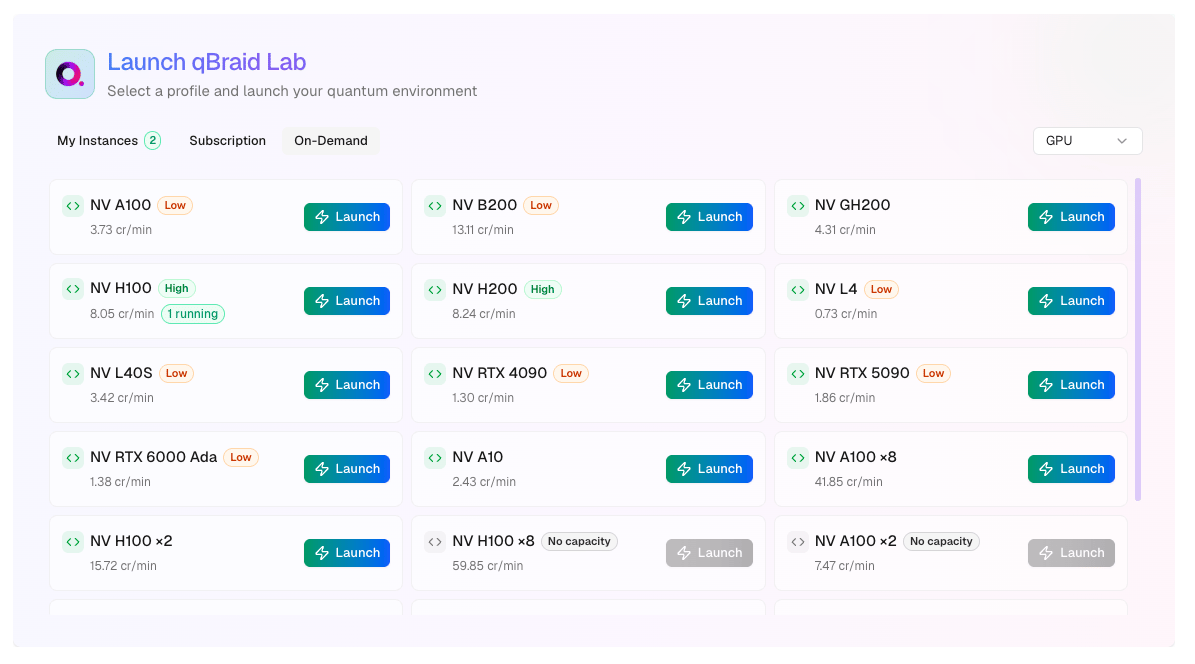
GPU instances may take a few minutes to provision as resources are allocated
on-demand.
Managing GPU Instances
GPU instances are on-demand instances with full start, stop, and terminate support:- Stop — Pauses billing for compute while preserving your disk and files. Resume anytime.
- Terminate — Permanently deletes the instance and its data. Stops all billing.
GPU Utilities
Further information about your GPU hardware can be retrieved using the NVIDIA System Management Interface (nvidia-smi) and
NVIDIA CUDA Toolkit (nvcc) command line utilities.
Visit your account page to see the
full list of GPU options including real-time availability.