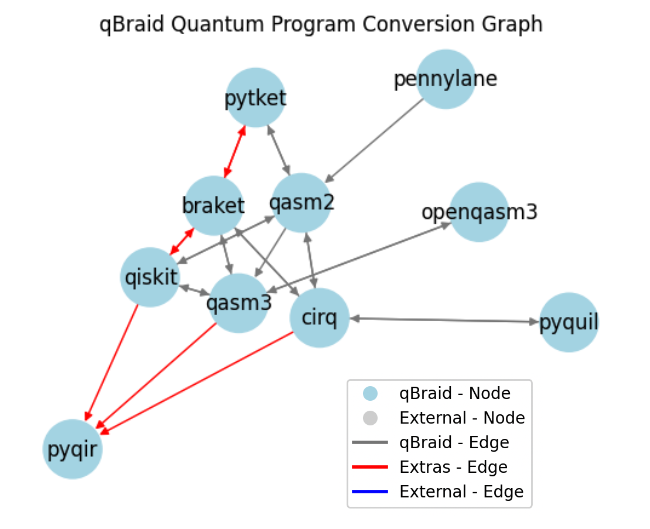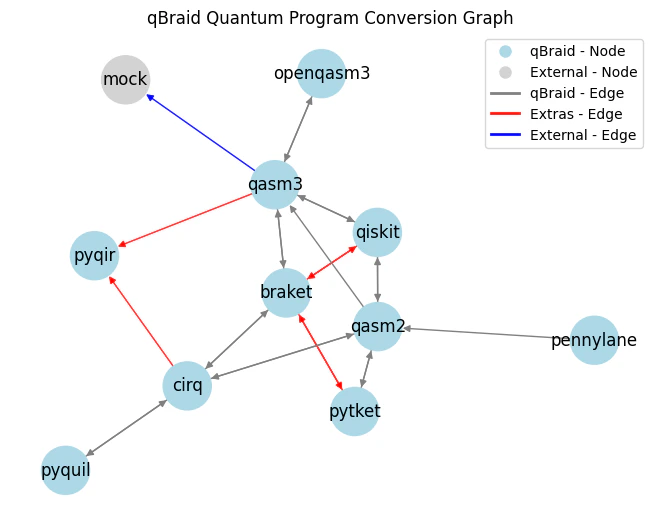

The qBraid-SDK transpiler allows converting quantum programs from one type to another, for any two program types for which a “conversion path” exists. Registered program types are interconnected via a directed graph, where each program type is represented as a node and supported conversions as edges. The breadth, depth, and connectivity of this ConversionGraph can be customized by the user.
API Reference: qbraid.transpiler

Conversion Graph

To view what conversions are available, you can plot the ConversionGraph:
Gray arrows denote conversions implemented and managed by qBraid. Red arrows represent conversions implemented by external packages or extensions. These are automatically incorporated into the conversion graph upon installing the specified ‘extra’. You can use the native conversions supported by qBraid, or define your own custom nodes and/or edges. For example:
Blue arrows indicate conversions added by the user during their current session. Check if a conversion is supported between two given program types, and if so, what “conversion path(s)” would be used:
Scope the conversions available to the transpiler by specifying your own conversions list:

Conversion Scheme

The ConversionScheme data class details information about conversion configurations, such as numbers of nodes and edges, as well as max depth.

Transpile

Using the qbraid.transpile function, simply pass in the name of the target package from one of qbraid.QPROGRAM_ALIASES. For example, use input "cirq" to return a cirq.Circuit:
This time, using the same origin circuit, we’ll input "pyquil" to return a pyquil.quil.Program: